Groups
The sections of stock, and how an item's code puts it in one.
Stock is sorted into groups: spirits, draught beer, minerals and so on. Each group is totalled on the sheet and the reports, with its own gross profit. You manage them on Bar settings.
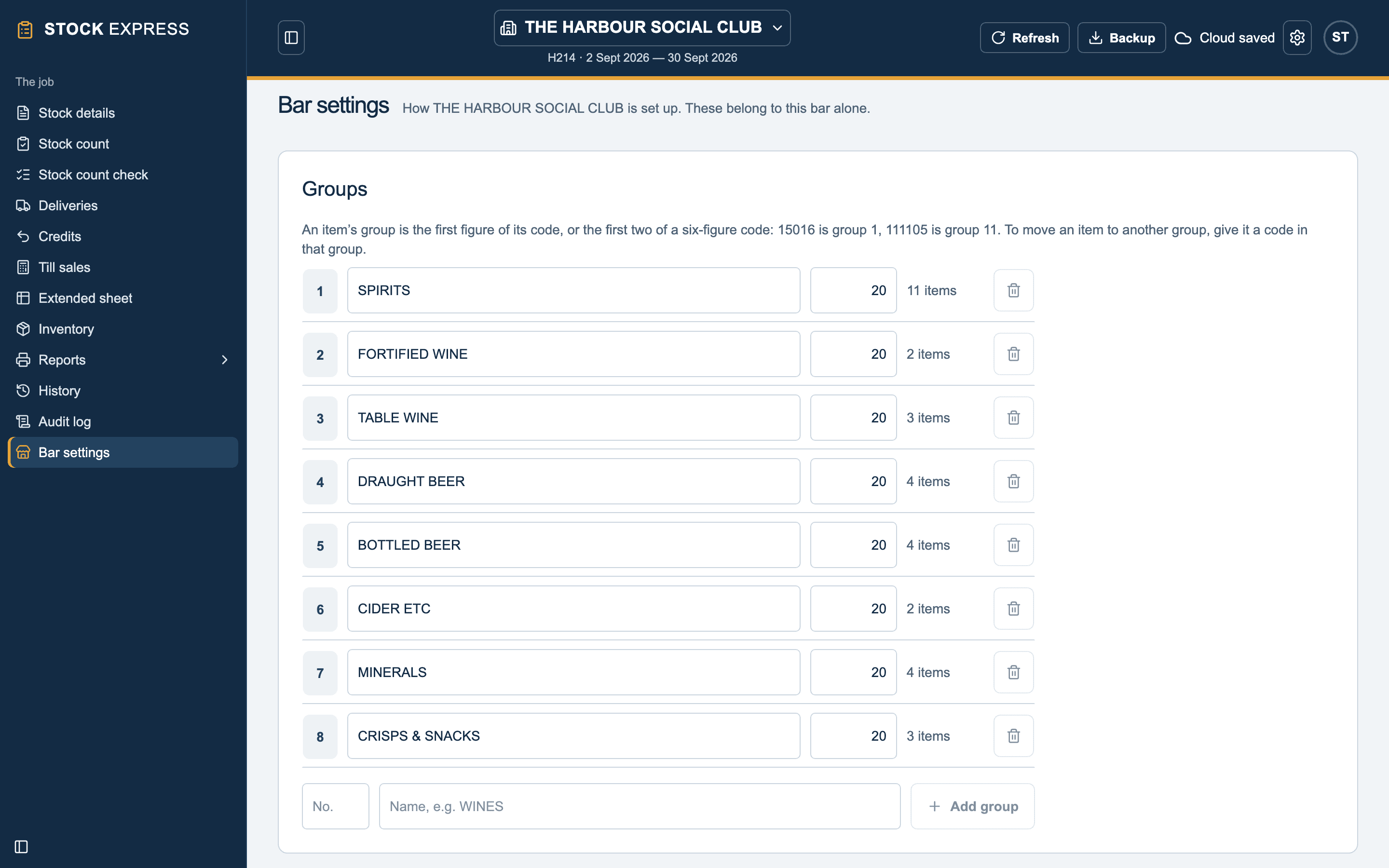
A new outlet starts with eight:
- SPIRITS
- FORTIFIED WINE
- TABLE WINE
- DRAUGHT BEER
- BOTTLED BEER
- CIDER ETC
- MINERALS
- CRISPS & SNACKS
An item's code is its group
An item's group is the first figure of its code, or the first two of a six-figure code. So 15016 is in group 1 (SPIRITS), and 111105 is in group 11. Each group on Bar settings shows how many items it has.
Changing groups
- Rename a group in its Group name box. Names are kept in capitals.
- VAT %: every group follows the outlet's rate, but a group can have its own, for example crisps and snacks at a different rate from spirits.
- Add a group: type its number (1 to 99) in New group number and its name in New group name, then Add group.
- Remove a group with the button beside it. That only works when it has no items; recode them into another group first, so they have somewhere to go.
Want to see this with one of your own outlets? Book a demo.