The cellar
A cellar that takes the deliveries, sends stock out to the bars, and is checked by the Cellar ledger.
A cellar, 00 CELLAR, takes the house's deliveries and sends stock out to the bars. It has no selling prices, till or takings. To add one, see Setting up the bars.
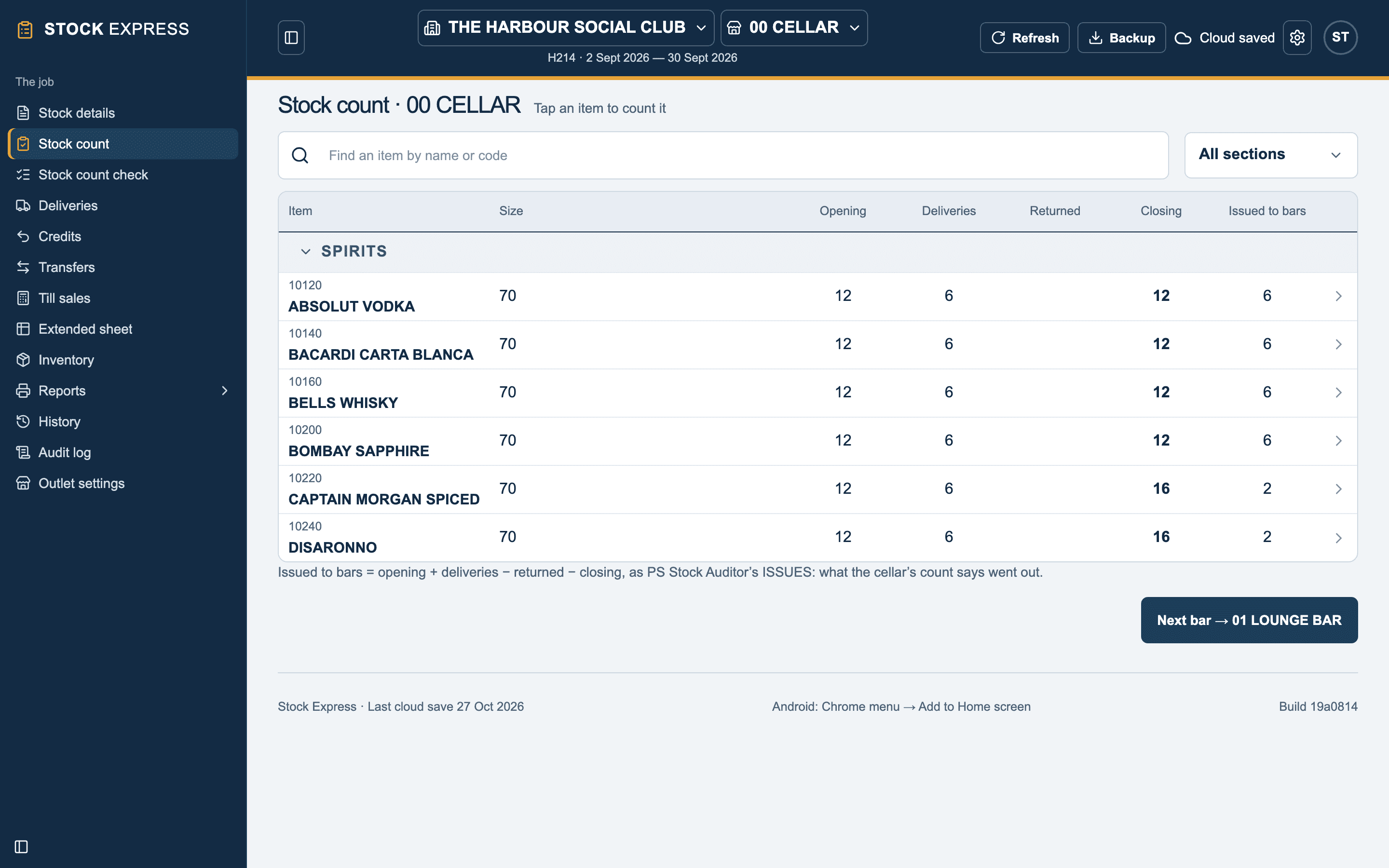
Counting the cellar
Choose 00 CELLAR in the bar list and count it as any bar. Its Stock count shows, for each item:
- Opening, Deliveries, Returned and Closing.
- Issued to bars = opening + deliveries − returned − closing: what the cellar's count says went out.
Once a house has a cellar, a bar's count pad has no Cellar column: stock in the cellar is counted in the cellar.
Deliveries
Enter the house's deliveries and credit notes with 00 CELLAR chosen. They are the cellar's, and reach the bars as transfers.
The Cellar ledger
What the cellar issued should be what the bars received. The Cellar ledger report, printed with All bars chosen, lists each item: what the cellar issued, what each bar took in, and the difference. Each line with a difference is marked, and the differences are totalled at cost and at selling price. The total is on the All bars together report too.
Want to try this with one of your own outlets? Start for free.