Transfers
Stock moved from the cellar to a bar, back again, or from one bar to another.
Transfers, in the menu on the left, lists the stock moved between the cellar and the bars this period. It is there once an outlet has more than one bar.
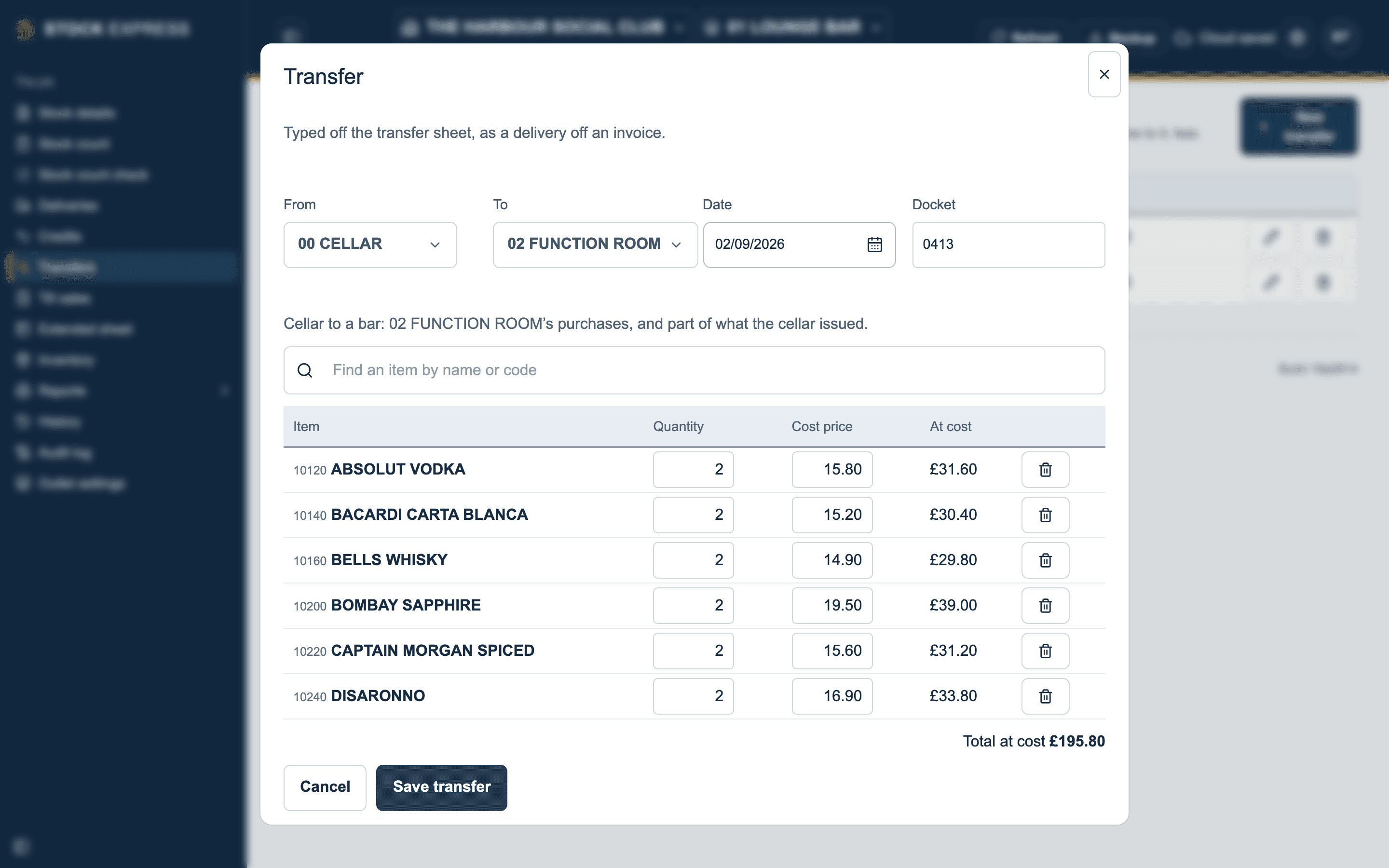
Typing in a transfer
Type each transfer off the transfer sheet, as you would a delivery off an invoice:
- Tap New transfer.
- Choose From and To: the cellar or a bar.
- Set the Date, and the Docket number if the sheet has one.
- Find each item and type its quantity. Its cost price is filled in, and its value at cost worked out, with the total at the foot.
- Tap Save transfer.
The window says what the transfer does, such as "Cellar to a bar: 02 FUNCTION ROOM's purchases, and part of what the cellar issued."
What a transfer does
- Cellar to a bar: the bar's purchases. It shows on the bar's Stock count as From cellar. Tap the figure to see the transfers it is made of.
- A bar back to the cellar: taken off the bar's purchases.
- One bar to another: off the first bar's purchases and onto the other's.
Quantities are always typed as they are, with no minus signs: From and To say which way the stock went.
Tap a transfer in the list to change it, or the bin to delete it.
Want to try this with one of your own outlets? Start for free.