Food & liquor outlets
A gastropub's bar and kitchen in one outlet, counted together, reported together and closed together.
A gastropub's bar and kitchen are one stock: the same dates, one count, one report pack. A Food & liquor outlet keeps them so. The bar is done as any drinks outlet's, and the kitchen as a food outlet's, side by side.
Setting one up
Choose Food & liquor under What does it stock? on New client, "The bar and the kitchen, stocked together and reported together." Type the Kitchen's opening stock £ and the Kitchen's target GP % with the rest. See Setting up a kitchen.
A drinks outlet that starts doing food can be given a kitchen instead: on Outlet settings, under Kitchen, tap Add a kitchen. It asks first, because it can't be undone: the outlet is Food & liquor from then on. Anything in this stock's food boxes on Stock details goes across into the kitchen: the opening stock, each purchase as a note, the credits, the takings and the allowances. Past stocks print as they always did.
It is marked Food & liquor beside its name. Its menu is a drinks outlet's, with Kitchen deliveries and Kitchen takings after Credits.
The groups: the bar's, then the kitchen's
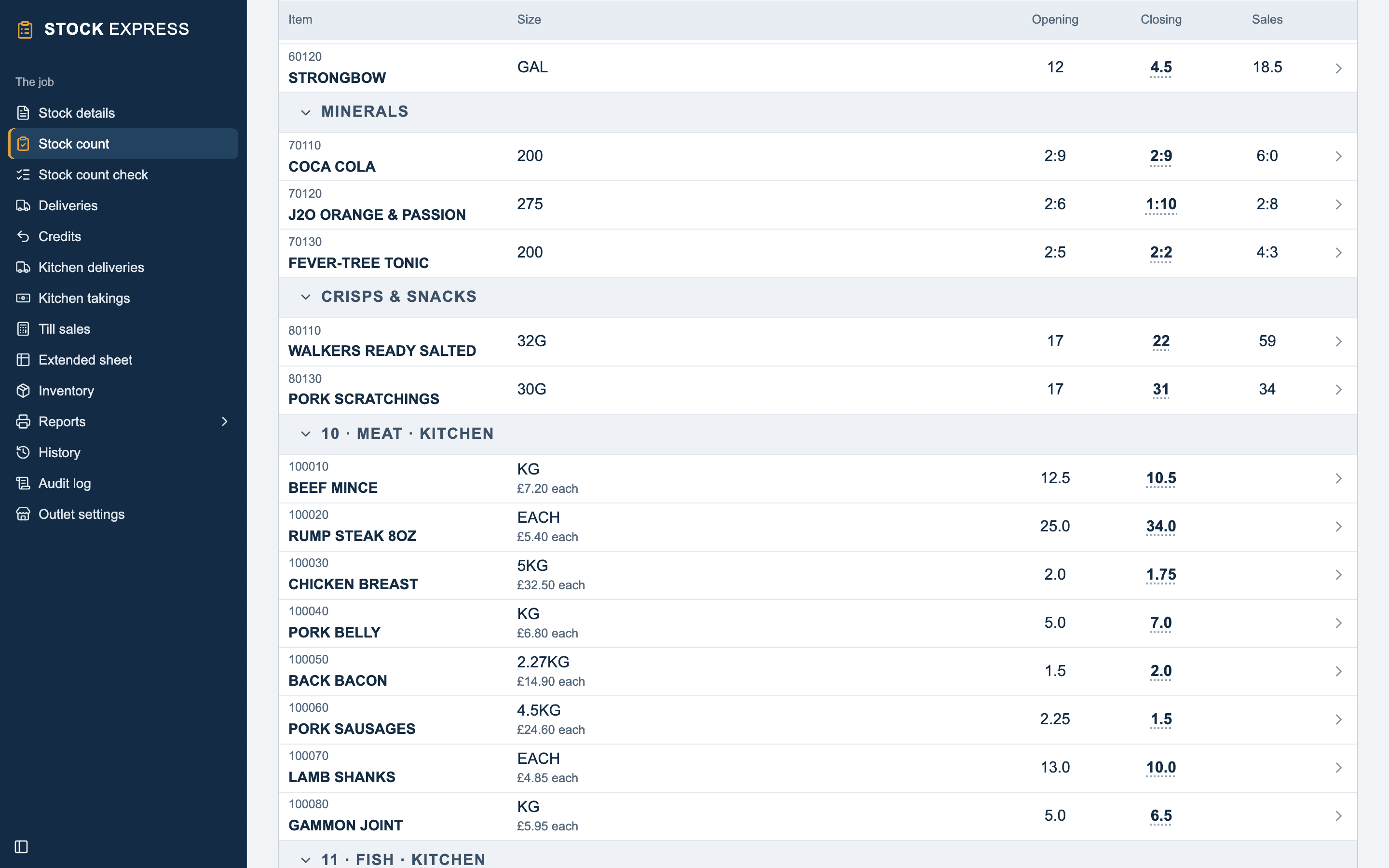
It starts with the bar's eight groups, then the kitchen's ten from group 10: 10 MEAT, 11 FISH and on to 19 CASH VALUES. On Outlet settings, each group has Counted in: Bar or Kitchen. A new group asks which. A group with items in it stays counted where it is.
An item is the kitchen's because of its group, so a kitchen item has a six-figure code: 100010 BEEF MINCE is in group 10, MEAT. Its window asks only its code, description, size and cost. Inventory lists the bar's items and the kitchen's together; Till sales and the Extended sheet are the bar's alone.
One count
Stock count goes down the bar's groups, then the kitchen's, headed with their number and KITCHEN, such as 10 · MEAT · KITCHEN: one walk round the pub. A bar item is counted on the drinks pad as ever. A kitchen item shows its cost, such as £7.20 each, and is counted on the kitchen's pad, to two decimal places. See Counting the kitchen.
Deliveries and takings, each side's own
- The bar's invoices and credit notes go on Deliveries and Credits, line by line, as ever.
- The kitchen's notes go on Kitchen deliveries, four boxes each, with Upload notes. See Deliveries.
- The bar's takings are typed on Stock details, as ever.
- The kitchen's weeks go on Kitchen takings. See Takings.
Each counts only on its own side. Stock details has The kitchen, in place of the food boxes: the Kitchen's opening stock at cost and the kitchen's allowances. The kitchen's target GP and Weeks start on are on Outlet settings, under The food stock.
Food taken from the bar
When the kitchen takes stock from the bar, such as wine for the pans, type it once, on Kitchen deliveries: a note from FROM BAR, at cost. It is the kitchen's purchase and, at the same time, a To food credit of the same value off the bar. Change the note and the credit changes with it; delete it and both go. The bar summary has a TO FOOD line.
It can be entered on the bar's side instead, as a credit note on Credits with Why it left the bar set to To the kitchen. It then shows on Kitchen deliveries as FROM BAR, marked as the bar's credit note, and is changed on Credits.
One report pack
Reports lists the bar's reports, then the kitchen's, with one cover sheet: the Food trading account, Food valuation, Kitchen delivery summary and Count sheets after the bar's. Under Charts, the bar's charts and The kitchen at a glance, The kitchen's history in charts and The kitchen year on year.
Three reports put the two together:
- Bar & food summary: Bar, Food and Total rows of opening, purchases less credits, closing, used, net takings, GP and GP%.
- Stock valuation: the bar's total, the kitchen's, and the stock on hand altogether.
- Stock audit history: the bar's GP, the food GP and the GP altogether for each stock.
Closing
The bar and the kitchen close together, with Start new period, and both open again on the count's day with their own stock carried forward. It won't close while the kitchen's takings stop short of the count, and says so, such as "The kitchen's takings stop at 17 October. Type them up to 23 October, the day before the count, first." Undoing the close brings both back exactly as they were.
Want to try this with one of your own outlets? Start for free.