Reports and closing
The Food Trading Account, the kitchen's report pack, closing the stock and the food history.
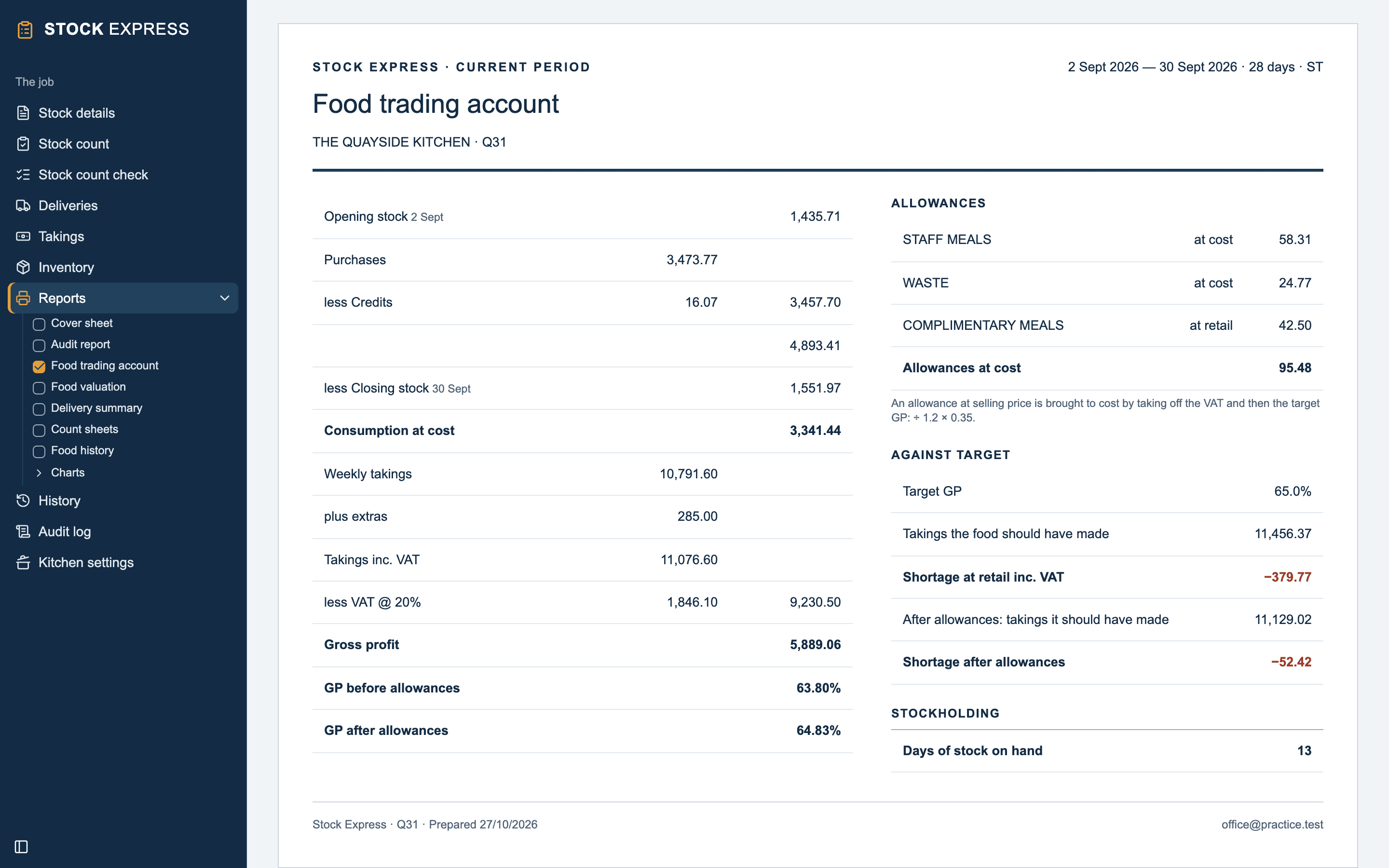
The Food Trading Account
The kitchen's result, line by line:
- Opening stock, plus Purchases, less Credits, less Closing stock: the Consumption at cost, the food used.
- Weekly takings, with any extras and deductions: Takings inc. VAT, less VAT, to the takings ex VAT.
- Gross profit: the takings ex VAT less the food used.
- GP before allowances and GP after allowances, as percentages.
Beside them, the Allowances, each at cost; Against target, what the food should have taken at the target GP and the shortage or surplus, before and after allowances; and Stockholding, the Days of stock on hand: how long the closing stock would last at the rate food was used.
The kitchen's pack
Open Reports and tick the reports you want, as for any outlet. See Reports.
| Report | What it shows |
|---|---|
| Cover sheet | The outlet, stock, job and your practice's details |
| Audit report | Your covering note to the outlet |
| Food trading account | The result, as above |
| Food valuation | Each item's count × cost, each group's total and the closing stock |
| Delivery summary | This stock's notes and credits |
| Count sheets | Sheets to count the kitchen on, with each item's last count |
| Food history | Each closed stock's line |
Under Charts: The period at a glance, judged after allowances against the target, History in charts and Year on year.
Before you print, Reports checks for items with no cost price, and for food used below nothing. See Checks before printing.
Closing the stock
Close the stock from Stock details with Start new period, as for any outlet. See Closing a period. The next stock opens on the count's day:
- The closing stock is its Opening stock at cost.
- This count is each item's Last count.
- Notes kept for the next stock are in its deliveries.
- The takings and allowance amounts start again; the allowances' names stay.
An admin can undo the close, and the stock comes back exactly as it was.
The food history
History has a Food history under the closed stocks: a line for each, with its dates and days, takings inc and ex VAT, food used at cost, GP after allowances and the stock on hand. It prints as the Food history report, newest first. A closed stock opens again, and prints again, from Reporting period on Reports.
Want to try this with one of your own outlets? Start for free.