Setting up a kitchen
A new food outlet, its groups and items at cost, and bringing a food house in from PSSA.
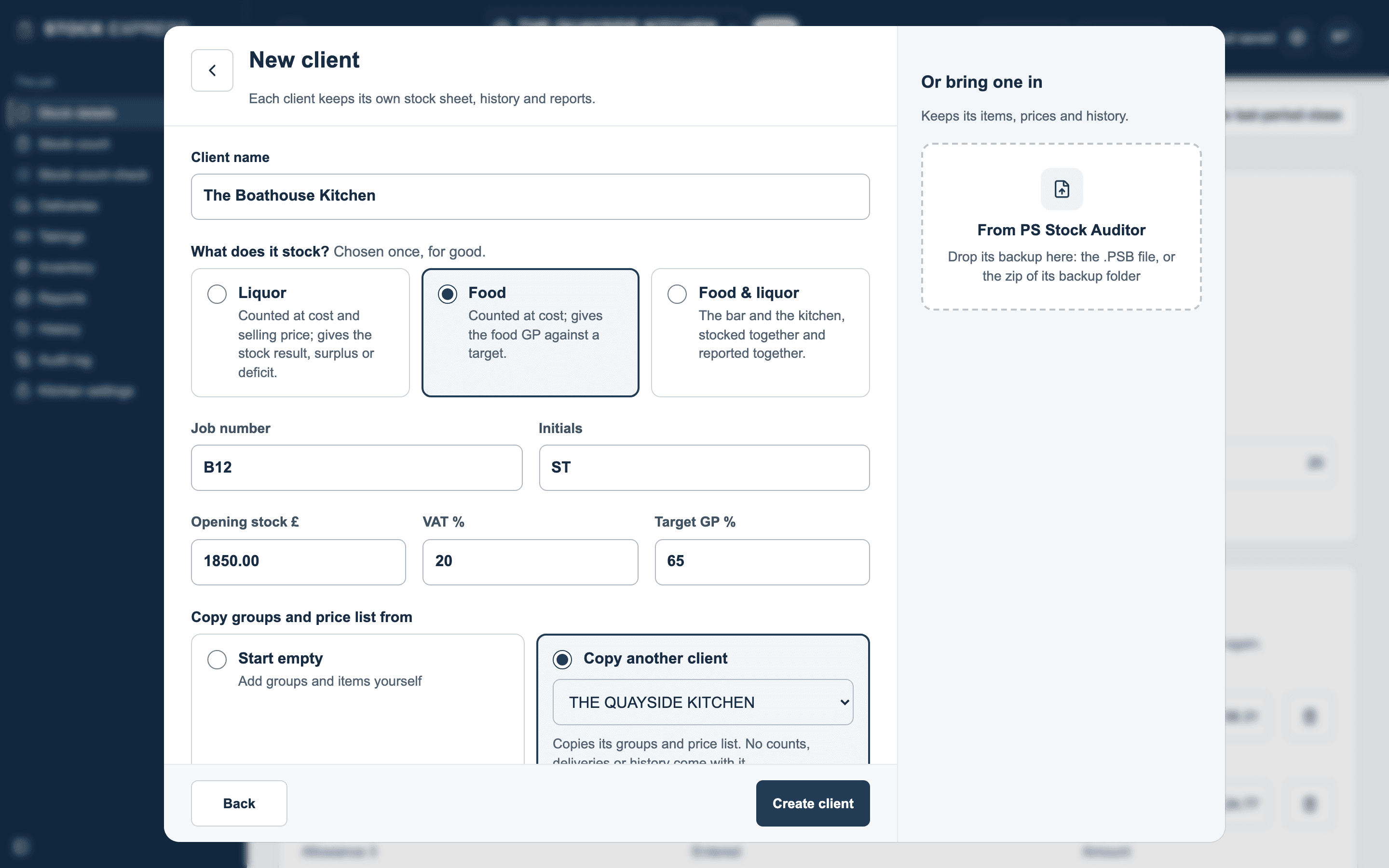
A new food outlet
Tap the outlet's name at the top, then New client, as for any outlet:
- Type the Client name.
- Under What does it stock?, choose Food. This is chosen once, for good: a food outlet can't be turned into a liquor one later.
- Type the Job number and Initials.
- Type the Opening stock £: the kitchen's stock at cost when you start, from its last count.
- Check the VAT %, and type the Target GP % the kitchen aims at, or leave it empty for none.
- Tap Create client.
Copy groups and price list from starts it from another of your food outlets' groups and items, with nothing counted.
Its groups
A new food outlet has ten groups, at 20% VAT: MEAT, FISH, FROZEN FOOD, JARS & BOTTLES, DRY GOODS, DAIRY PRODUCE, FRESH FRUIT, FRESH VEGETABLES, LIQUOR and CASH VALUES. Rename them, change a rate or add more on Kitchen settings, as on a bar's Outlet settings.
Its items
On Inventory, tap New item and give its Item code, Item description, Item size and Cost price. That is all: a kitchen item has no selling price or yield. The list shows each item's size, cost price and whether it is on the stock sheet.
An item's group comes from its code, as a bar's does: the first figure of a five-figure code. 10010 BEEF MINCE is in group 1, MEAT; 20010 COD LOIN in group 2, FISH. Group 10, CASH VALUES, takes six-figure codes from 100001.
When a price goes up, change the item's cost price: the count is valued at it.
Bringing a food house in from PSSA
From PS Stock Auditor, beside the New client form, brings a food house in as a food outlet: its groups and items, the stock in hand with its counts, notes and weeks of takings, and its past stocks in the food history. It says what came in, and that its figures came to PSSA's: the food used, the GP, the shortage and the days of stock. Tap Open the kitchen. See Coming from PS Stock Auditor.
A food outlet can't be sent back to PSSA as a backup. It stays here, with its whole history in History.
Want to try this with one of your own outlets? Start for free.